
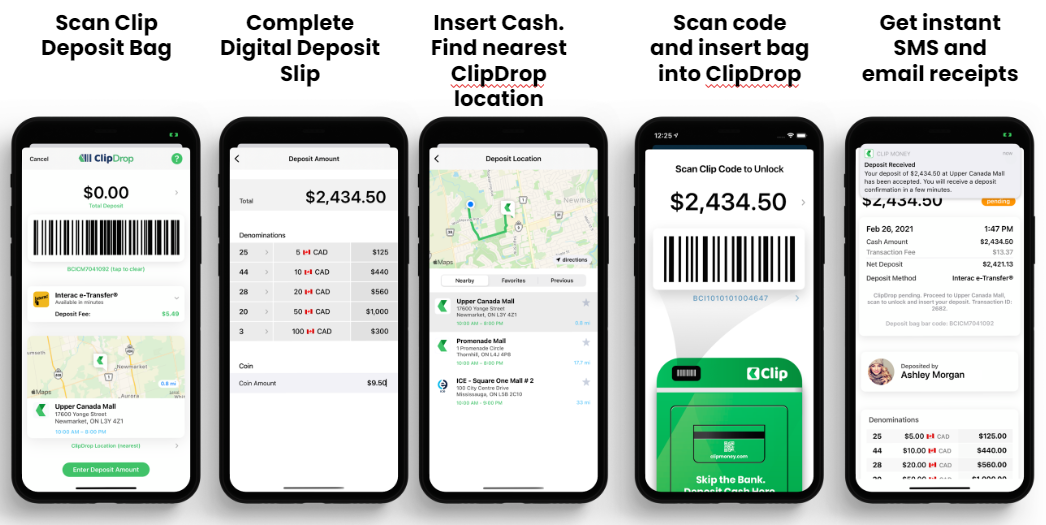
Clip's user-friendly and intuitive interface makes it easy to prepare your deposit in 5 simple steps.
How does Clip Work?
- Clip combines our easy-to-use application with our secure ClipDrop deposit box.
- Customers download the free Clip Money app, complete the signup by registering their business and banking information.
- Once completed Clip will review and approve the customer for deposits and establish a daily credit limit for the business.
- When the account is created, the business owner will sign a Pre-Authorization Transaction agreement which will allow Clip to credit the account to make deposits or debit if there is a shortfall that needs to be reconciled (which the customer will be fully informed of in advance). This can be done in-app or via a physical form.
- The customer can now begin using the Clip app.
- Customer will pick the drop location > fill out the deposit amount on the App > place money into tamper-evident RFID bag provided by Clip > seal bag > drop into the nearest ClipDrop at their convenience (scanning the bag will release the drop to allow the customer to drop deposit)
- At each stage, a notification is sent to confirm the deposit was received and they can proceed to the ClipDrop. Once the deposit is dropped a digital notification will be sent.
- For iOS, customers will receive a push message via a notification to the app. Android users will receive an SMS message. Email notifications will be coming in 2022.
- All current and past deposits can be viewed on the app
- Permissions can be granted by the business owner to allow employees to make deposits via their own mobile devices giving owners complete control over the deposit process.
Comments
0 comments
Article is closed for comments.